> ## Documentation Index
> Fetch the complete documentation index at: https://docs.pawtograder.com/llms.txt
> Use this file to discover all available pages before exploring further.
# Feature flags
> The nine course feature flags, their defaults, and exactly which menu entries each one hides
# Feature flags
Nine switches decide which Pawtograder modules your course uses. Six of them remove entries from the course navigation bar when you turn them off, so a procedure elsewhere in this guide that starts "open **Surveys** in the course menu" quietly stops applying. If a menu entry named in a procedure is missing from your course, check this page first.
## Opening the page
Open **Course Settings → Feature flags** in the course navigation bar. The entry is instructor-only. Graders never see it in the menu, and a grader who reaches the URL gets "Access denied. This page is only available to instructors."
Each flag is one card with a title, a description, and a single switch. There is no Save button and no confirmation step. Flipping a switch writes the change immediately and raises a **Saved** toast. If the write fails, the switch snaps back to its previous position and an error toast reports why.
The global search palette lists **Feature flags** for all course staff, so a grader can reach the URL from search and land on the access-denied message. Only instructors can read or change the switches.
## The nine flags
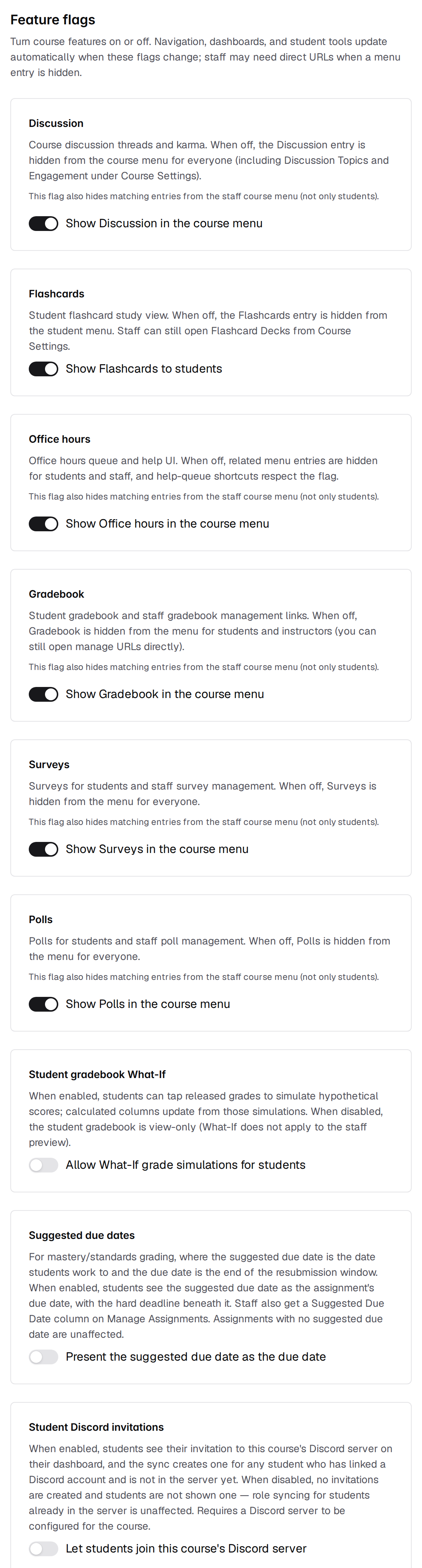 | Flag | Card title | Switch label | Default |
| ---------------------- | --------------------------- | -------------------------------------------------- | ------- |
| `discussion` | Discussion | **Show Discussion in the course menu** | On |
| `flashcards` | Flashcards | **Show Flashcards to students** | On |
| `office-hours` | Office hours | **Show Office hours in the course menu** | On |
| `gradebook` | Gradebook | **Show Gradebook in the course menu** | On |
| `surveys` | Surveys | **Show Surveys in the course menu** | On |
| `polls` | Polls | **Show Polls in the course menu** | On |
| `gradebook-what-if` | Student gradebook What-If | **Allow What-If grade simulations for students** | Off |
| `suggested-due-date` | Suggested due dates | **Present the suggested due date as the due date** | Off |
| `discord-student-join` | Student Discord invitations | **Let students join this course's Discord server** | Off |
A course records only the flags an instructor has touched. Every flag you have never flipped uses the default in the table above, so a brand-new course arrives with the six module flags on and the three opt-in flags off. Turning a flag on and then off again leaves an explicit off setting rather than returning it to "unset", but the two behave identically.
## What each flag hides
The **Default** column above tells you the starting state. This table tells you what is absent whenever a flag is off, split by who loses it. Five of the nine flags — `discussion`, `office-hours`, `gradebook`, `surveys`, and `polls` — take menu entries away from staff as well as students, and the page marks those five cards with the line "This flag also hides matching entries from the staff course menu (not only students)." A sixth, `suggested-due-date`, changes what staff see without touching the menu, so its card carries no such line.
| Flag | Students lose | Staff lose |
| ---------------------- | -------------------------------------------------------------------------------------------------------------------- | ----------------------------------------------------------------------------------------------------------------------------------------------------------------------------------- |
| `discussion` | The **Discussion** nav entry and the discussion activity summary on the student dashboard | The **Discussion** nav entry, **Course Settings → Discussion Topics**, **Course Settings → Discussion Engagement**, and the discussion activity summary on the instructor dashboard |
| `flashcards` | The **Flashcards** nav entry | Nothing. **Course Settings → Flashcard Decks** is not flagged and stays available |
| `office-hours` | The **Office Hours** nav entry, the floating help-request button, and the office hours card on the student dashboard | The **Office Hours** nav entry and the open office hours requests list on the instructor dashboard |
| `gradebook` | The **Gradebook** nav entry | The **Gradebook** nav entry. This one is instructor-only to begin with, so graders have no gradebook entry either way |
| `surveys` | The **Surveys** nav entry, the surveys-to-complete banner, and the active surveys section of the student dashboard | The **Surveys** nav entry and the surveys panel on the instructor dashboard |
| `polls` | The **Polls** nav entry | The **Polls** nav entry |
| `gradebook-what-if` | The ability to type hypothetical scores into the student gradebook | Nothing |
| `suggested-due-date` | Suggested dates presented as the assignment's due date | The **Suggested due** field in the assignment header and the **Suggested Due Date** column on **Manage Assignments** |
| `discord-student-join` | Their invitation to the course's Discord server on the dashboard | Nothing |
Flag state also reaches two places that are easy to forget. The global search palette drops the entries for a disabled module, and the `g` chord shortcuts (press `g`, then a letter) for **Office Hours**, **Gradebook**, **Discussion**, **Flashcards**, **Polls**, and **Surveys** stop working while the matching flag is off.
## The three behavior flags
Six flags only govern what appears in menus. These three change how a feature behaves.
### Student gradebook What-If
While the flag is on, students can click any grade card that is not itself calculated from other gradebook columns and type a hypothetical score, and the calculated columns recompute from the simulation. While it is off, the student gradebook is view-only and carries the line "Grade simulations (What If) are not enabled for this course. You can still view released grades below." What-If has never applied to the staff view of a student's grades, on or off.
See [Gradebook](/staff/gradebook) for how simulations interact with overrides and calculated columns.
### Suggested due dates
This flag is for mastery and standards grading, where the suggested due date is the date students work toward and the recorded due date is the end of the resubmission window. Turning it on presents an assignment's suggested date to students as the due date, with the hard deadline shown beneath it, and renames the late-token control from **Extend Due Date** to **Extend Resubmission Deadline**. Assignments with no suggested due date set are unaffected either way.
The **Suggested due date** field on the assignment form stays visible whether or not the flag is on, so you can set dates before opting in. The field's helper text tells you which state the course is in.
See [Assignment Dashboard](/staff/assignments/assignment-dashboard) for where the suggested date appears once the flag is on.
### Student Discord invitations
This flag needs a Discord server configured for the course. With no server connected it has no effect in either position.
While it is on, students see their invitation to the course's Discord server on their dashboard, and the sync creates one for every student who has linked a Discord account and is not in the server yet. While it is off, no invitations are created and no student is shown one. Role syncing for students who are already in the server is unaffected.
Turning the flag back on does not retroactively create the invitations skipped while it was off. Those students are recorded as not joined with no invite. The Discord membership panel tells you how many are waiting, on **Course Settings → Discord** and on **Course Settings → Enrollments**; only the Discord page carries the retry button. The next scheduled sync also picks them up, but only for courses inside the active-class window.
## Feature flags control navigation, not access
Feature flags are a curation tool. They decide which modules your course puts in front of students and staff, and when — so you can hold Surveys or Flashcards back until the week they matter, retire Polls once you have stopped using them, and keep the course menu down to what the course is actually doing. Staff pages behave the same way, which is deliberate: a module you are not running should not clutter anyone's menu.
What a flag does not do is grant or withhold permission. Turning a module off is a statement about what the course shows, not a lock on the module's content. Nothing is deleted or sealed away, which is what makes a flag safe to flip back and forth across a term, and it is also why a flag is the wrong tool when the requirement is that nobody may read something. The one flag that does more than curate navigation is `discussion`: with it explicitly off, **Course Settings → Discussion Engagement** sends you back to the course home page.
When you genuinely need material withheld — an assignment still being written, a survey you are not ready to run, a deck nobody should see yet — act on the material, not the menu. Unpublish it, hold it behind its release date, or delete it. Those are the controls that decide who may read something; a flag decides who can find it.
The staff search palette is gated alongside the menu, with one exception: its **Manage office hours** entry stays in the palette after you turn `office-hours` off, even though the nav entry is gone. This is a known issue with an open report against Pawtograder, and a fix is on the way.
## What happens to data you turn off
Flipping a switch rewrites one entry in the course's feature list and touches nothing else. Discussion threads and karma, flashcard decks, office hours queues and help requests, gradebook columns and scores, survey responses, and poll results all survive intact and reappear the moment you turn the flag back on.
Two specifics worth knowing:
* **Gradebook.** The `gradebook` flag is read only by the navigation bar, the search palette, and the keyboard shortcuts. Turning it off hides the links; it does not stop grade calculation, imports, or releases.
* **What-If.** Simulations are never saved. Turning `gradebook-what-if` off costs students nothing they had saved, because there was nothing saved.
The one flag whose off state has a lasting consequence is `discord-student-join`, described above: invitations not created while it was off are not created later on their own.
## Related pages
The full Course Settings menu and what each of its entries does.
The instructor and grader navigation sets, and which entries are flag-gated.
| Flag | Card title | Switch label | Default |
| ---------------------- | --------------------------- | -------------------------------------------------- | ------- |
| `discussion` | Discussion | **Show Discussion in the course menu** | On |
| `flashcards` | Flashcards | **Show Flashcards to students** | On |
| `office-hours` | Office hours | **Show Office hours in the course menu** | On |
| `gradebook` | Gradebook | **Show Gradebook in the course menu** | On |
| `surveys` | Surveys | **Show Surveys in the course menu** | On |
| `polls` | Polls | **Show Polls in the course menu** | On |
| `gradebook-what-if` | Student gradebook What-If | **Allow What-If grade simulations for students** | Off |
| `suggested-due-date` | Suggested due dates | **Present the suggested due date as the due date** | Off |
| `discord-student-join` | Student Discord invitations | **Let students join this course's Discord server** | Off |
A course records only the flags an instructor has touched. Every flag you have never flipped uses the default in the table above, so a brand-new course arrives with the six module flags on and the three opt-in flags off. Turning a flag on and then off again leaves an explicit off setting rather than returning it to "unset", but the two behave identically.
## What each flag hides
The **Default** column above tells you the starting state. This table tells you what is absent whenever a flag is off, split by who loses it. Five of the nine flags — `discussion`, `office-hours`, `gradebook`, `surveys`, and `polls` — take menu entries away from staff as well as students, and the page marks those five cards with the line "This flag also hides matching entries from the staff course menu (not only students)." A sixth, `suggested-due-date`, changes what staff see without touching the menu, so its card carries no such line.
| Flag | Students lose | Staff lose |
| ---------------------- | -------------------------------------------------------------------------------------------------------------------- | ----------------------------------------------------------------------------------------------------------------------------------------------------------------------------------- |
| `discussion` | The **Discussion** nav entry and the discussion activity summary on the student dashboard | The **Discussion** nav entry, **Course Settings → Discussion Topics**, **Course Settings → Discussion Engagement**, and the discussion activity summary on the instructor dashboard |
| `flashcards` | The **Flashcards** nav entry | Nothing. **Course Settings → Flashcard Decks** is not flagged and stays available |
| `office-hours` | The **Office Hours** nav entry, the floating help-request button, and the office hours card on the student dashboard | The **Office Hours** nav entry and the open office hours requests list on the instructor dashboard |
| `gradebook` | The **Gradebook** nav entry | The **Gradebook** nav entry. This one is instructor-only to begin with, so graders have no gradebook entry either way |
| `surveys` | The **Surveys** nav entry, the surveys-to-complete banner, and the active surveys section of the student dashboard | The **Surveys** nav entry and the surveys panel on the instructor dashboard |
| `polls` | The **Polls** nav entry | The **Polls** nav entry |
| `gradebook-what-if` | The ability to type hypothetical scores into the student gradebook | Nothing |
| `suggested-due-date` | Suggested dates presented as the assignment's due date | The **Suggested due** field in the assignment header and the **Suggested Due Date** column on **Manage Assignments** |
| `discord-student-join` | Their invitation to the course's Discord server on the dashboard | Nothing |
Flag state also reaches two places that are easy to forget. The global search palette drops the entries for a disabled module, and the `g` chord shortcuts (press `g`, then a letter) for **Office Hours**, **Gradebook**, **Discussion**, **Flashcards**, **Polls**, and **Surveys** stop working while the matching flag is off.
## The three behavior flags
Six flags only govern what appears in menus. These three change how a feature behaves.
### Student gradebook What-If
While the flag is on, students can click any grade card that is not itself calculated from other gradebook columns and type a hypothetical score, and the calculated columns recompute from the simulation. While it is off, the student gradebook is view-only and carries the line "Grade simulations (What If) are not enabled for this course. You can still view released grades below." What-If has never applied to the staff view of a student's grades, on or off.
See [Gradebook](/staff/gradebook) for how simulations interact with overrides and calculated columns.
### Suggested due dates
This flag is for mastery and standards grading, where the suggested due date is the date students work toward and the recorded due date is the end of the resubmission window. Turning it on presents an assignment's suggested date to students as the due date, with the hard deadline shown beneath it, and renames the late-token control from **Extend Due Date** to **Extend Resubmission Deadline**. Assignments with no suggested due date set are unaffected either way.
The **Suggested due date** field on the assignment form stays visible whether or not the flag is on, so you can set dates before opting in. The field's helper text tells you which state the course is in.
See [Assignment Dashboard](/staff/assignments/assignment-dashboard) for where the suggested date appears once the flag is on.
### Student Discord invitations
This flag needs a Discord server configured for the course. With no server connected it has no effect in either position.
While it is on, students see their invitation to the course's Discord server on their dashboard, and the sync creates one for every student who has linked a Discord account and is not in the server yet. While it is off, no invitations are created and no student is shown one. Role syncing for students who are already in the server is unaffected.
Turning the flag back on does not retroactively create the invitations skipped while it was off. Those students are recorded as not joined with no invite. The Discord membership panel tells you how many are waiting, on **Course Settings → Discord** and on **Course Settings → Enrollments**; only the Discord page carries the retry button. The next scheduled sync also picks them up, but only for courses inside the active-class window.
## Feature flags control navigation, not access
Feature flags are a curation tool. They decide which modules your course puts in front of students and staff, and when — so you can hold Surveys or Flashcards back until the week they matter, retire Polls once you have stopped using them, and keep the course menu down to what the course is actually doing. Staff pages behave the same way, which is deliberate: a module you are not running should not clutter anyone's menu.
What a flag does not do is grant or withhold permission. Turning a module off is a statement about what the course shows, not a lock on the module's content. Nothing is deleted or sealed away, which is what makes a flag safe to flip back and forth across a term, and it is also why a flag is the wrong tool when the requirement is that nobody may read something. The one flag that does more than curate navigation is `discussion`: with it explicitly off, **Course Settings → Discussion Engagement** sends you back to the course home page.
When you genuinely need material withheld — an assignment still being written, a survey you are not ready to run, a deck nobody should see yet — act on the material, not the menu. Unpublish it, hold it behind its release date, or delete it. Those are the controls that decide who may read something; a flag decides who can find it.
The staff search palette is gated alongside the menu, with one exception: its **Manage office hours** entry stays in the palette after you turn `office-hours` off, even though the nav entry is gone. This is a known issue with an open report against Pawtograder, and a fix is on the way.
## What happens to data you turn off
Flipping a switch rewrites one entry in the course's feature list and touches nothing else. Discussion threads and karma, flashcard decks, office hours queues and help requests, gradebook columns and scores, survey responses, and poll results all survive intact and reappear the moment you turn the flag back on.
Two specifics worth knowing:
* **Gradebook.** The `gradebook` flag is read only by the navigation bar, the search palette, and the keyboard shortcuts. Turning it off hides the links; it does not stop grade calculation, imports, or releases.
* **What-If.** Simulations are never saved. Turning `gradebook-what-if` off costs students nothing they had saved, because there was nothing saved.
The one flag whose off state has a lasting consequence is `discord-student-join`, described above: invitations not created while it was off are not created later on their own.
## Related pages
The full Course Settings menu and what each of its entries does.
The instructor and grader navigation sets, and which entries are flag-gated.