

Assigning Grading Tasks
Pawtograder has a robust feature to allow instructors to assign grading tasks to staff. When a grading task is assigned, the instructor can set a due date for that task, and re-assign the task to a different grader if needed. When reassigning a rubric part to a TA who already completed grading a different rubric part for the same submission, the new work will appear in their pending work list. Pawtograder will also automatically allow any other grader to complete the task if the original grader is unable to complete it (without needing to re-assign the task).Automatic Completion of Related Reviews
When a grader completes their assigned review, Pawtograder automatically:- Marks other review assignments as complete if they cover the same or a subset of rubric parts
- Completes the overall submission review when all required rubric checks are satisfied
- Validates that uncovered rubric parts have no blocking requirements before marking the submission complete
Conflicts of Interest
Pawtograder will automatically ensure that graders do not grade assignments that they have a conflict of interest in. Graders can self-input their conflicts (under “Course Settings” - “Grading Conflicts”), and instructors can review and enter conflicts for all graders in the class. Graders are encouraged to input a “Reason” for their conflict, so that instructors can understand the nature of the conflict and help avoid declaring spurious conflicts.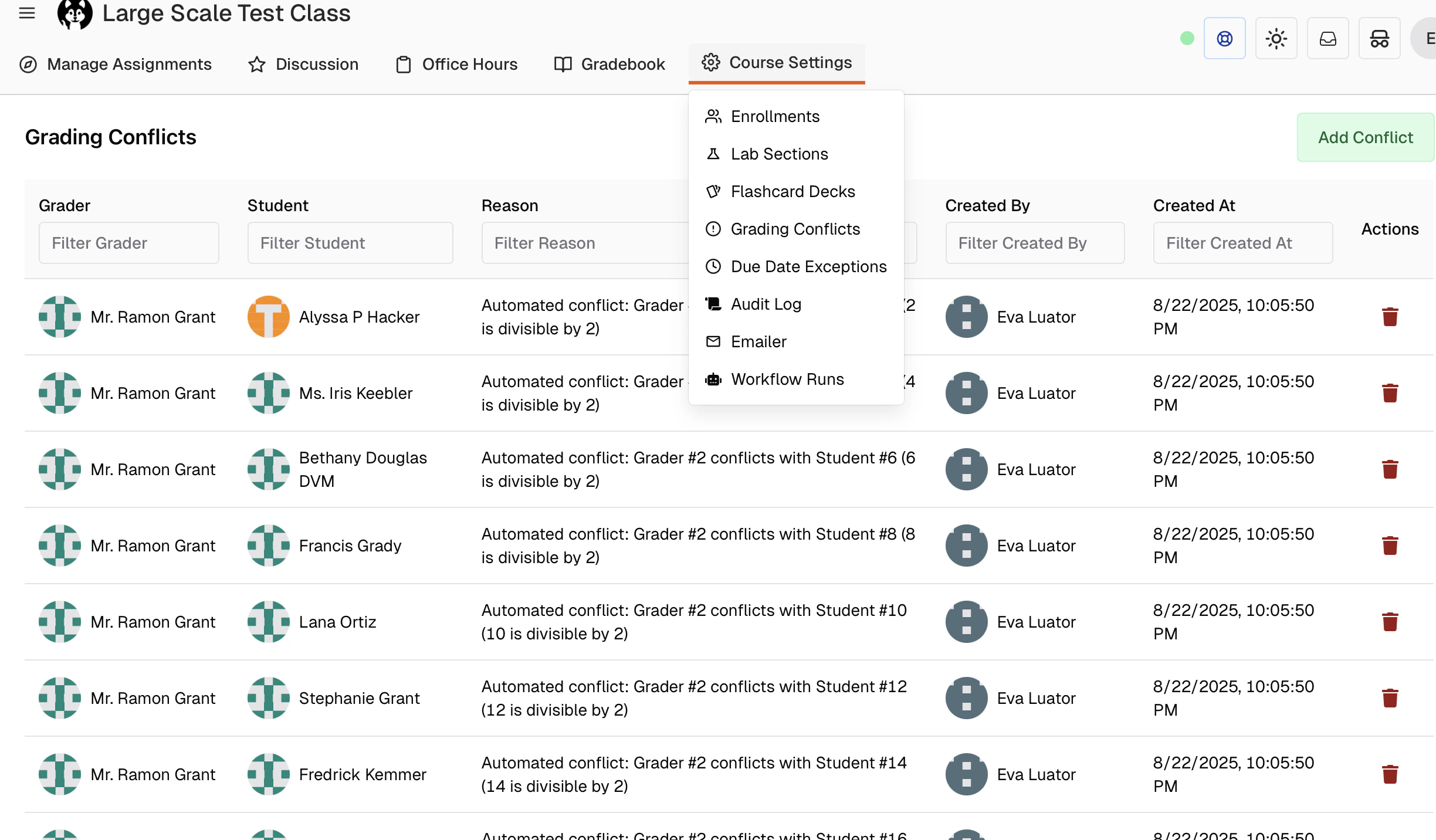
Bulk Assign Grading
Pawtograder’s Bulk Assign Grading feature (from an Assignment’s “Grading Assignments” page) allows instructors to assign grading tasks to staff in bulk. When reassigning a rubric part to a TA who already completed grading a different rubric part for the same submission, the system automatically clears the completion timestamp so the new work appears in their pending work list.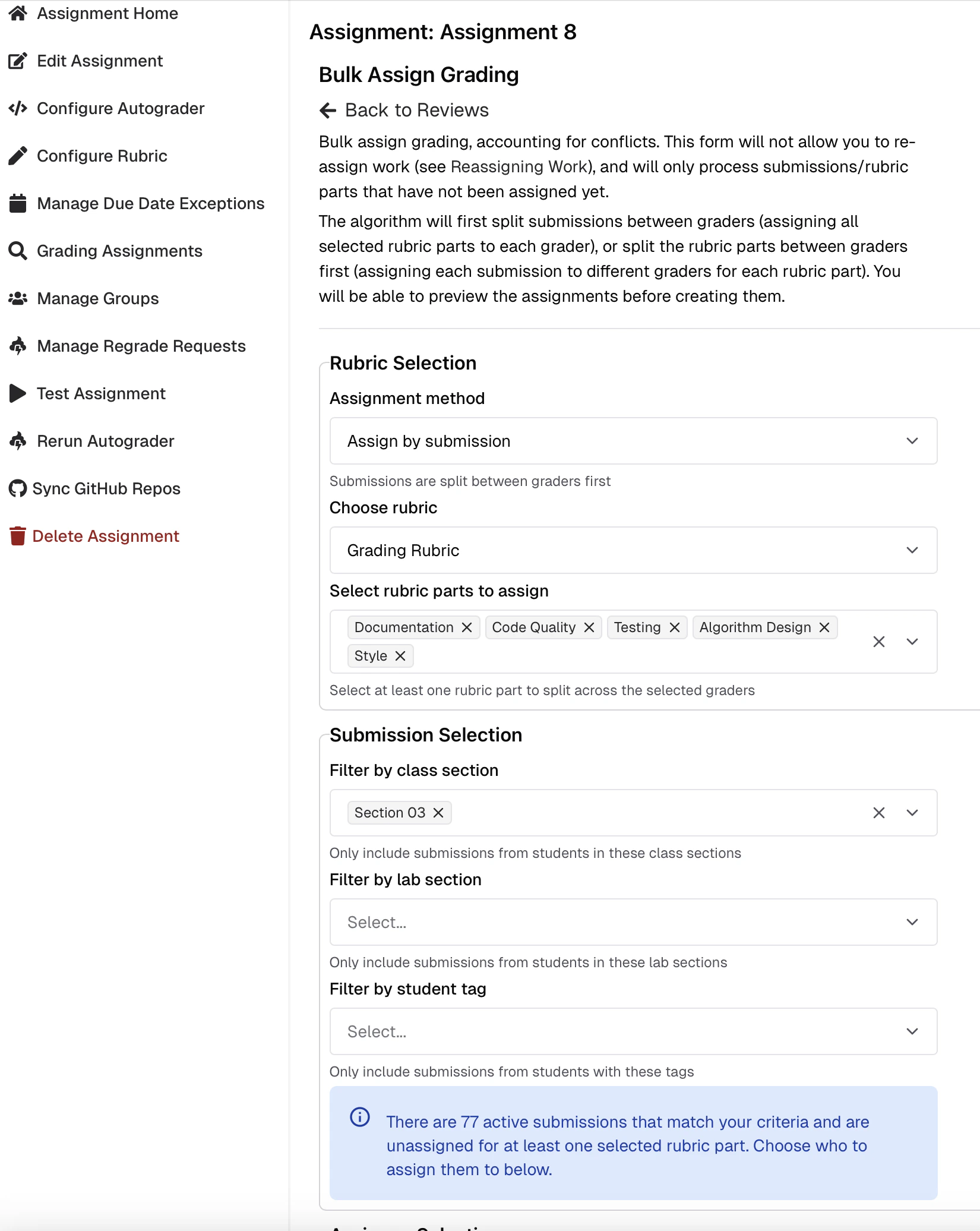
Assignment modes
The algorithm offers several distribution modes:- By submission: Submissions are split between graders first. Each grader receives complete submissions with all selected rubric parts.
- By rubric part: Rubric parts are split between graders first. Each submission is graded by multiple graders, each handling different rubric parts — allowing specialization.
- Assign to lab leaders: Each submission is automatically assigned to all lab leaders of the student’s lab section. No manual grader selection is needed.
- Assign to group mentors: Each group’s submission is automatically assigned to the group’s mentor. Submissions without groups or without assigned mentors are skipped. Grading conflicts are still respected.
Assigning Group Mentors
For group assignments, you can assign mentors to student groups from the assignment’s Groups management page. Each group can have one assigned mentor — typically a grader or instructor who provides guidance and feedback to specific groups throughout the assignment. To set a group mentor:- Navigate to the assignment’s Groups page.
- Find the Mentor column in the groups table.
- Select a grader or instructor from the dropdown for each group.
- The mentor assignment is saved automatically.
- Are displayed to students on their submission pages and in the group widget.
- Can be automatically assigned to grade their groups’ submissions using the Assign to group mentors bulk grading mode.
- Can view analytics for only their assigned groups in survey responses.
Review Due Dates
Each review assignment has its own due date — separate from the student’s submission due date. Adjust them per row by editing the review assignment in the Grading Assignments table, or in bulk via the Bulk edit grading due dates / Bulk edit self-review due dates buttons; details in Bulk Actions → Bulk Review Due Date Updates.Grading Comments and Review Release
Once a review has been released to students, grading comments are locked to maintain grading integrity. Graders cannot edit or delete their comments after the review is released, ensuring that students receive consistent feedback and preventing post-release modifications that could cause confusion. Instructors retain full editing privileges and can modify any comment, even after release. If you need to make larger changes to feedback after release, unrelease the review first, make your edits, and then re-release it.TA messaging when feedback is released
When a TA attempts to add or change marks on a submission whose review has already been released, Pawtograder now shows a clear warning instead of a generic permission error:“This grading feedback has already been released to students, so you cannot add or change marks. Ask your instructor to click Unrelease on this submission review if a change is needed; after edits, they can release again.”This warning appears in the rubric sidebar and as a toast notification when a TA tries to save a comment or annotation on a released review. The rubric criteria panel also shows a warning banner so TAs see the restriction before attempting to save.
Group Grading with Split Rubrics
When grading group assignments, Pawtograder supports per-student adjustments even when using split rubrics. This allows you to:- Apply different scores to individual group members for specific rubric items
- Add student-specific notes and feedback within a group submission
- Maintain fair grading when group members contribute differently
Individual Grading for Group Assignments
For group assignments, Pawtograder supports individual grading where each group member receives a separate grade. This is useful when group members contributed unequally, when you want to assess individual understanding within a group context, or when different group members demonstrated different levels of mastery.Enabling individual grading
Individual grading is not an option on the grading-assignment flow. It is a property of a rubric part, set in the rubric editor or in rubric YAML:- Individual grading (
is_individual_grading) grades the part once per group member. The rubric sidebar shows a separate section per student, and checks and comments are scoped to that student. - Assign to student (
is_assign_to_student) lets the grader pick which single student the part applies to, or skip it.
Best practices
- Communicate expectations: Let students know in advance if group assignments will be graded individually.
- Document differences: When assigning different grades to group members, provide clear feedback explaining the differences.
- Consider peer feedback: Use peer feedback surveys to inform individual grading decisions.
- Be consistent: Apply the same grading criteria to all group members, adjusting scores based on individual contribution or understanding.
Reassigning Grading Tasks
After grading tasks have been assigned, instructors can reassign them to different graders when a grader is unable to complete their assigned tasks, when workload needs to be rebalanced, or when a conflict of interest is discovered after assignment.Reassigning a single review
Click the edit icon on the review’s row in the All Assignments table to change its assignee or due date. See Editing individual review assignments below.Reassigning one grader’s remaining work
Reassignment in bulk is grader-centric, not submission-centric. Follow the Reassign Grading by Grader link on the Manage Review Assignments page, then:- Select the grader whose remaining work you want to reassign.
- Choose the rubric.
- Set how many of that grader’s incomplete submissions to reassign. The form tells you how many are incomplete for this rubric.
- Choose the target role (Instructors, Graders, or Instructors and graders), optionally filter those staff by tag, and optionally name specific assignees.
- Choose a load-balancing strategy: Balance based on new assignments or Balance based on all assignments.
- Set the review due date.
- Click Prepare Reassignments, adjust the draft in the drag-and-drop preview, then click Reassign.
How reassignment works
- When a submission is reassigned, it appears in the new grader’s pending work list immediately.
- Even if the new grader had already marked a different rubric part of the same submission complete, the reassigned part still arrives as pending rather than being treated as already done.
- Any existing grading work (comments, rubric checks) is preserved and remains visible to the new grader, who can continue or modify it.
- Reassignments respect conflict-of-interest rules.
- Graders are not notified automatically. Use Generate Reminder Email on the Grading Progress Dashboard to tell them.
Reassignment preserves all existing grading work. If a grader has already started grading a submission, their work will remain visible to the new grader and can be continued or modified.
Automatic completion by other graders
Even without explicit reassignment, any grader with appropriate permissions can complete a grading task assigned to another grader. This allows for flexible workflows where graders can help each other meet deadlines, backup graders can step in when needed, and instructors can review and complete any grading task. The original assignee remains listed as the primary grader, but the completion is tracked with the actual grader’s identity.Automatic reassignment on resubmission
When a student submits a new version of their work after grading has begun, Pawtograder automatically handles the reassignment of grading tasks. The system will:- Move incomplete grading assignments to the new active submission
- Preserve existing grading comments on the original submission
- Reopen grading assignments so graders can review the new submission
- Prevent data loss by detecting conflicts with existing grading work
Bulk Operations on Submissions
For row-selected bulk release and unrelease, the assignment-wide Finalize grading action, and filtering by group mentor, see Bulk Actions.Managing Review Assignments
Viewing review assignments
The All Assignments tab provides a comprehensive view of all review assignments, organized into two sub-tabs:- Grading reviews: Shows all non-self-review rubric assignments (grading review, meta-grading, code walk, etc.).
- Self reviews: Shows only self-review rubric assignments.
- Submitter information
- Assignee details
- Due dates (in the course’s configured timezone)
- Review status (Not Started, In Progress, Completed)
- Rubric and review round (grading reviews only)
Editing individual review assignments
Click the edit icon on any review assignment row to modify:- Due date: Set or update the deadline for completing the review.
- Assignee: Reassign the review to a different grader (grading reviews only).
Bulk editing review due dates
Use the Bulk edit grading due dates or Bulk edit self-review due dates buttons to update multiple review assignments at once:- Select a rubric from the dropdown (required).
- Choose a new due date and time.
- Optionally check Only rows not yet completed to skip finished reviews.
- Click Apply to matching rows.
Tracking Progress
Use the Grading Status view to monitor overall progress, per-grader workload, and pending reviews across the assignment.Managing Repository Permissions
For assignments with GitHub repositories, the Fix Permissions button on the Repositories page lets you audit and correct GitHub repository permissions for all assignment repositories in a single operation:- Navigate to the assignment’s Repositories page.
- Click Fix Permissions.
- The system audits all repositories, computes the correct collaborator list from current group membership, and enqueues permission sync jobs for each repository. Repositories that haven’t been created on GitHub yet, or where no students have confirmed GitHub usernames, are skipped.
Grading Students Without a Submission
Every enrolled student appears on the assignment roster, even if they haven’t submitted yet. Students without an active submission show a “Not submitted” status and a Grade anyway button.Grade anyway
Clicking Grade anyway on a non-submitter row opens a confirmation dialog, then creates an empty stub submission for that student (or their group, for group assignments) and navigates directly to the grading page. The student can see the stub submission once it is created.If the student later makes a real submission, it automatically supersedes the stub — the stub is deactivated and the roster updates to point at the real submission.
Grading progress counts
The grading progress panel counts only students with an active submission toward the totals. A separate Not submitted: N indicator shows how many enrolled students still have no submission for the assignment.Bulk assign for all students
When using Bulk Assign Grading, the default behavior assigns grading only to students who have already submitted. Enable the Assign grading for all students toggle to also create empty stub submissions for non-submitters (respecting the current section, lab, and tag filters) before drafting grading assignments. This is useful when you want to ensure every enrolled student receives a grading assignment regardless of submission status.Student Overview Page
The student overview page (accessible from Manage → Students → select a student) provides instructors with a comprehensive view of an individual student’s course participation and performance.Student information
- Email address: The student’s account email.
- Lecture section: If enrolled in a Canvas/SIS section, displays the section name, meeting times, and location.
- Lab section: Shows the lab section name, meeting times, location, and assigned section leaders.
Assignments table
The assignments table shows all course assignments with the following information for the selected student:- Title: Assignment name (linked to submission if available)
- Group: For group assignments, displays the group name, other group members (excluding the viewed student), and the group mentor (if assigned)
- Submission #: Ordinal number of the submission (linked to submission page)
- Submission Time: When the student submitted
- Autograder Score: Automated test results
- Total Score: Final grade out of maximum points
- Due Date: Assignment deadline (with any student-specific adjustments)
- Adjust Due Date: Quick access to modify the due date for this student