

Late Tokens and Extensions
What your instructor configured wins. This page describes how Pawtograder behaves in the setup most courses use. Almost every rule below is a per-assignment or per-course setting, and your instructor chose the settings for your course on purpose, as part of how they want the course to run. So if your assignment behaves differently from what you read here, the most likely reason is that your course is set up differently, by design. Your assignment page and your course’s own policies are the authority on what applies to you. Ask your course staff if you are not sure, or if what you see looks wrong rather than merely different.
- Late tokens: you choose to spend a token to extend a deadline.
- Instructor-granted extensions: staff manually add time to your deadline, separately from tokens.
Late Tokens
Pawtograder supports late submission policies based on “late tokens.” Your instructor decides how many late tokens each student in the course gets, and caps how many of them can be spent on any one assignment. Each token extends your deadline by 24 hours, and the extended deadline is then treated as your deadline. Pawtograder applies no automatic late penalty on top. Normally you have to spend a token before the deadline passes. The dialog says so: “Tokens are not automatically applied - to use them, you must use this form to apply them BEFORE the due date passes.” Once your deadline has passed, the control is replaced by “(Firm date: You have passed the due date)”.If Your Course Applies Tokens Automatically
Some courses let you push late and have tokens spent for you. If yours does, the dialog reads “Tokens can be applied before the due date using this form, or will be automatically applied when you submit after it”, and once the deadline has passed the assignment page reads “(Deadline passed: submitting will auto-apply a late token if you have one remaining)”. A late push then costs however many whole days of tokens it takes to cover how late it is, and the extension you receive is that same whole number of days — not the number of hours you were actually late. A push 30 hours late costs two tokens and moves your deadline by 48 hours. If your balance can’t cover it, the push is rejected and no token is spent.Applying Late Tokens
On each assignment page where late tokens can be applied, you’ll see an Extend Due Date button next to your due date. In a course that uses suggested due dates, that button reads Extend Resubmission Deadline instead, because the later date is the one a token can move.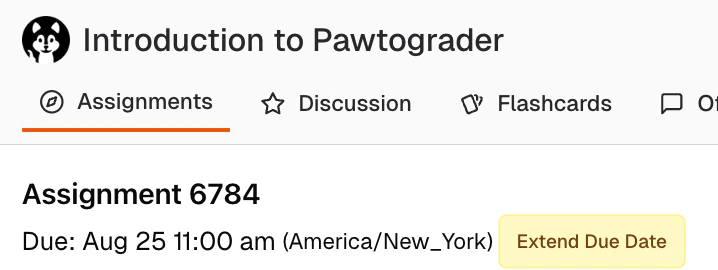
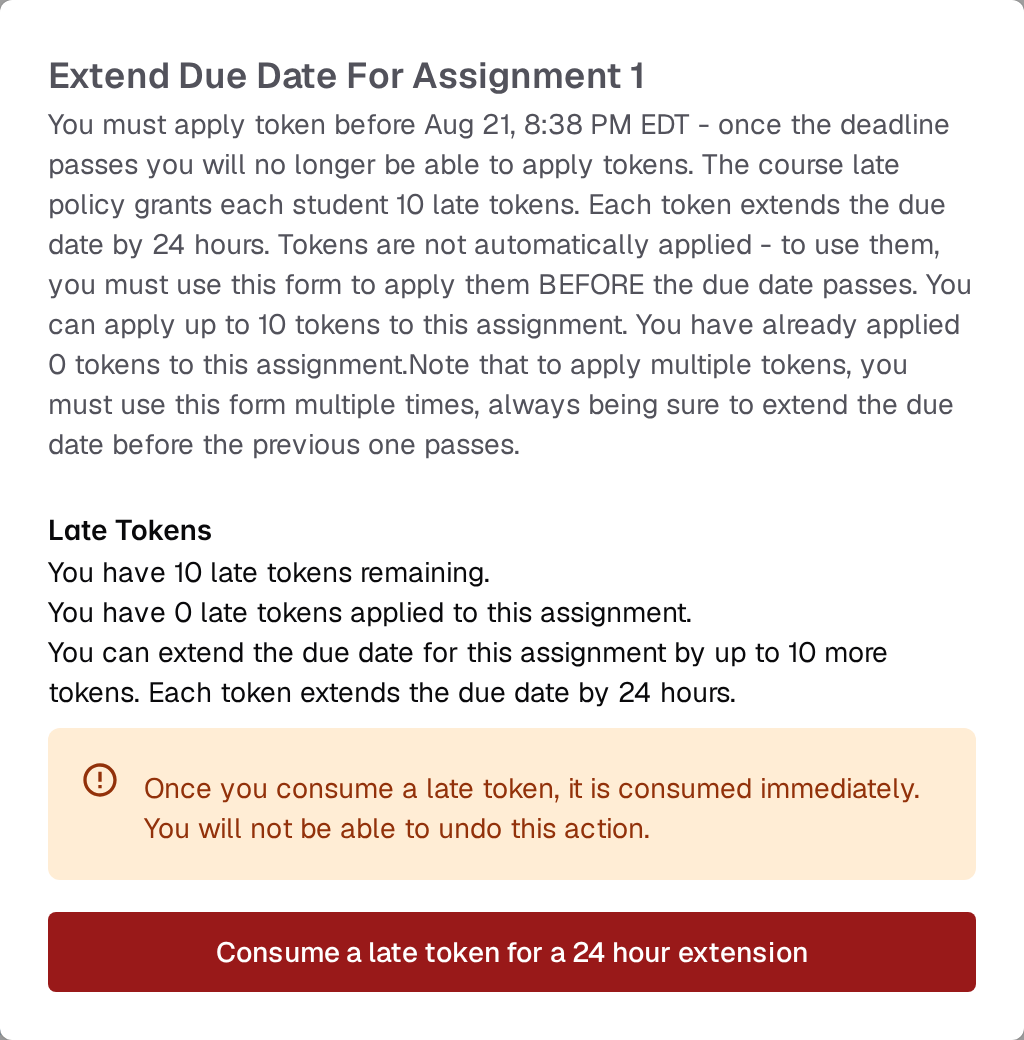
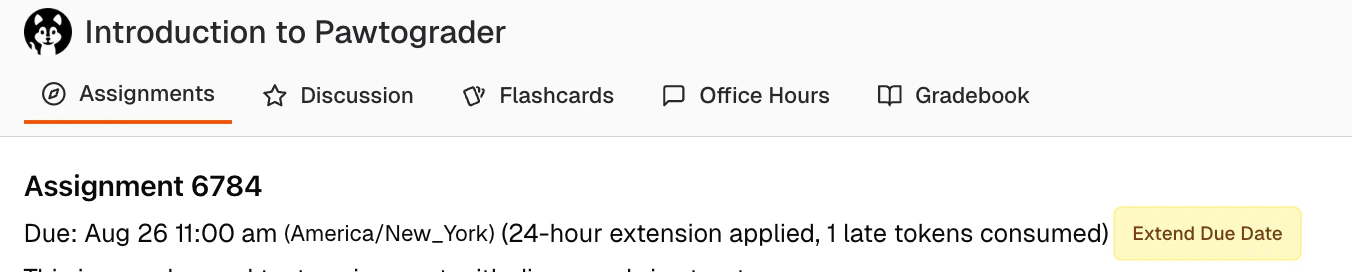
If You Don’t See the Button
Where you can’t extend a deadline, the button is replaced by a short message saying why:- (No late submissions allowed): your course grants no late tokens at all.
- (You have no remaining late tokens): you have spent your whole course allowance.
- (You may not extend the due date for this assignment any further): you have reached your instructor’s per-assignment cap. You will also see this message — rather than “No late submissions allowed” — on an assignment your instructor set to accept no tokens at all, even in a course that grants them.
- (Firm date: You have passed the due date): the deadline has passed on an assignment whose tokens had to be applied beforehand.
- (You may not extend the due date for this assignment as you finalized early): see below.

Finalizing a Submission Early
On an assignment with a self-review, your instructor may offer a Finalize Submission Early button, which moves your deadline to now so that the self-review opens immediately. Confirming it warns you that “You will not be able to change your submission after this.” See Completing a Self-Review.Gifted Late Tokens
Instructors can gift additional late tokens to individual students beyond the class-wide allocation. The Extend Due Date dialog is the place to read your balance: it states how many tokens you have remaining, and that figure already accounts for anything your instructor has gifted you. So gifted tokens:- Are added to your available token balance automatically
- Work exactly like your original tokens — each extends a deadline by 24 hours
- Are included in the “You have N late tokens remaining” count in the dialog
- Can be used even after you’ve exhausted your initial allocation
Late Tokens and Group Assignments
For group assignments, late token semantics are designed to be straightforward and fair:- Any group member with at least one token available can apply a late token (so long as the assignment’s per-assignment token cap hasn’t been reached). It does not matter if a groupmate is out of tokens.
- All group members have a token deducted from their balance.
- All group members see the same extended due date.
Instructor-Granted Extensions
Separately from late tokens, instructors can grant extensions directly. These are different from late tokens in two important ways:- They don’t consume your token budget. Your remaining token count is unchanged.
- You don’t apply them yourself. The extension is added by staff and takes effect automatically; your due date simply moves.
- For a specific assignment, just for you (or your group)
- Across all of your assignments in the course, e.g. as a blanket accommodation

If you believe you need an extension, contact your instructor directly. Extensions are not requested through Pawtograder — they’re entered by staff on your behalf.