

Gradebook
The gradebook shows the grades your instructor has released and, when the feature is turned on, lets you explore hypothetical scenarios with What-If calculations. Your instructor releases grades one column at a time, so the page fills in over the term.Viewing Your Grades
Open the Gradebook page from the course menu — it appears only if your instructor has enabled the gradebook for the course. The page is a list of grade cards, grouped by the first part of each column’s slug: columns whose slugs start withhomework- land in a Homework group, and assignment-lab-* columns land in a Lab group. Only columns that sit next to each other in your instructor’s column order are grouped together, so the same prefix can appear as two separate groups.
Each grade card shows:
- Column name
- Your score, followed by
/and the maximum points when the column has a maximum - A rendered value, when your instructor configured one — a letter grade or a checkmark, for example. It appears before the number, which is then wrapped in parentheses:
A (95/100) - A status word in place of a number when there isn’t one yet:
N/A,Not Submitted,Submitted,Missing,Excused, orIn Progress - The column description, if your instructor wrote one. This is usually the best explanation of what the column measures
- View Submission, when the column is tied to an assignment you have a submission for
- A pencil icon, when an instructor has overridden a released value. Hover it to read the instructor’s note, if they left one
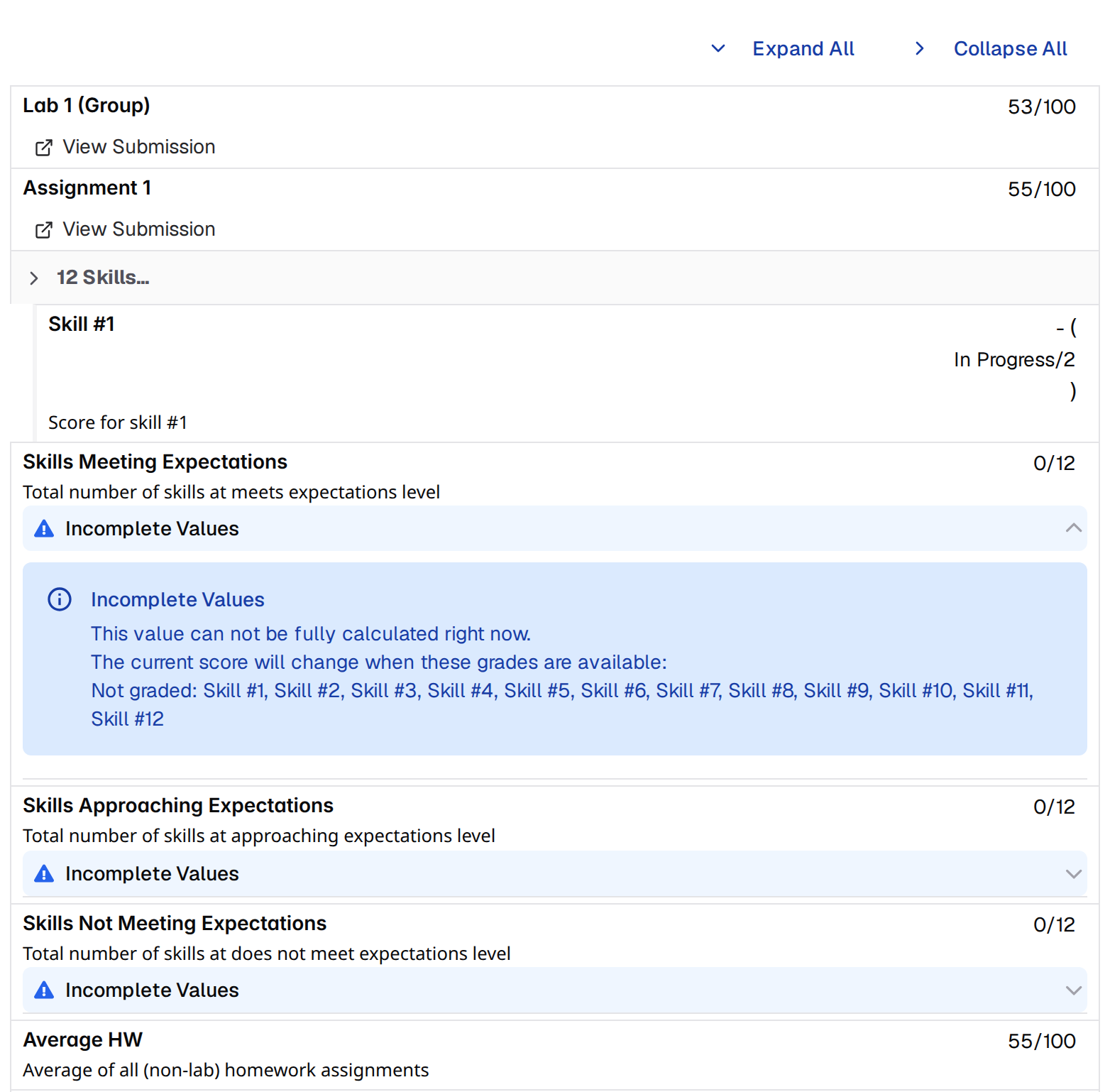
In Progress means the column exists but your grade has not been released to you yet. You can see the column, its maximum score, and its description before release. Only columns your instructor marks staff-only are hidden from you entirely until they are released.Expand and Collapse Groups
Groups with more than one column start collapsed. A collapsed group shows a header like4 Homeworks... plus one representative card: the last column in the group once any grade in it exists, otherwise the first. Click the header to expand the group and see every column in it.
Expand All and Collapse All appear at the top of the page whenever at least one group has more than one column.
Understanding Incomplete Values
A calculated grade that can’t be fully computed yet carries a collapsed Incomplete Values notice. Expand it to see which grades it is still waiting on:- Missing — columns that feed the calculation and have no grade
- Not graded — columns that feed the calculation and have not been released to you
What-If Simulations
What-If is off unless your instructor turns it on. When it’s off, the gradebook is view-only and the page says “Grade simulations (What If) are not enabled for this course. You can still view released grades below.”
Using What-If Mode
1
Open a grade card for editing
Click anywhere on an editable card, or use the wand button on it. Editable cards show a wand button whenever What-If is on.
2
Type a hypothetical score
Every keystroke applies immediately — calculated columns that depend on this one recompute as you type. There is nothing to confirm.
3
Close the editor
Press Enter or Escape, or click elsewhere. Your simulated value stays in place, and the card is tinted and marked with a blue wand icon.
Clearing Simulations
Reopen the card and delete everything in the input. The card returns to your real grade and every dependent calculated column recomputes. There is no reset-everything control — you clear one card at a time.Limitations
- You can simulate any column that is not calculated from other gradebook columns. Columns that do depend on other columns are read-only, since those are the ones What-If recomputes for you
- If an instructor has overridden a column, the override wins: you can still open the editor, but your simulated value won’t be displayed for that column
- What-If values live only in the page you’re looking at. Reloading or navigating away discards them
- Simulations are never saved, are not visible to your instructor, and don’t change your real grades
What-If is a planning tool. It does not change your real grades or notify anyone.