

Assignment Configuration
Per-assignment settings are configured from Edit Assignment in the assignment’s left-hand nav. This page documents what each field does, in the order the form presents them: Basics, Schedule, Late submissions, Groups, Student Repositories, Submission mode, Self-evaluation, and the collapsed Advanced settings accordion. A few settings that shape the student experience live somewhere else entirely; those are collected at the end under Settings that are not on this form. Group-specific settings are covered in Groups; the extension and late-token workflow is in Extensions.Common vs. uncommon. Every setting on this page is real and supported. The ones marked
default are what a new assignment gets and what the
student guide describes. Anything marked uncommon
will surprise students, because Pawtograder’s interface does not explain your reasoning for
you — if you turn one on, say so in your own course materials.
Basics
Title, Slug (the short URL identifier), and Points possible.Points possible and score capping
- Points Possible is the assignment’s maximum, displayed in the gradebook and used as the denominator for percentages.
- Score capping is configured on the rubric (not the assignment). In the rubric editor, toggle Cap score to assignment points on the Grading Rubric to cap the combined autograder + handgrading score at the assignment’s Points Possible.
Schedule
All dates are displayed in the course’s configured time zone (set under Course Settings); the field label includes the time zone for clarity. Individual viewers may switch their display to their browser’s local time zone via the time-zone toggle in the user menu — this is a per-browser preference and does not change the course’s configured time zone or what other users see.- Release date — when the assignment becomes visible to students and student repositories are created. Get every handout material in place before this time.
- Due date — the hard deadline, and the only date submission enforcement consults. Per-student or per-group overrides are configured under Extensions.
- Suggested due date — uncommon. An optional advisory date on or before the due date. It is display-only: it never affects submission enforcement, late tokens, or lab scheduling. The field is always on the form, but students only see it when the Suggested due dates course feature flag is on, in which case the suggested date is presented to students as the due date and the real due date is presented beneath it as the end of a resubmission window. The form’s helper text tells you which state your course is in. See Feature Flags to turn it on.
- Regrade Request Deadline — the deadline after which students cannot submit new regrade requests. Leave it empty for no deadline, which is the default. This one lives in Advanced settings.
Late submissions
Two settings share this card, and neither one is about whether late work is accepted — that is decided by the due date plus whatever extensions exist.Late tokens
Late tokens are off by default at the platform level, on both axes: the per-assignment maximum and the class-wide allotment both start at zero. A student can only spend a token when both are above zero, so granting late tokens is a deliberate two-part decision you make for your course, not something you get for free.- Max late tokens is the most tokens a student may spend on this
assignment;
0means late tokens are not allowed here. The class-wide allotment students draw from is Late Tokens Per Student under Course Settings → Due Date Extensions. - Each token pushes the student’s own due date back 24 hours.
- Require students to apply late tokens before the original due date is checked by default. Uncheck it and a token is applied automatically when a student submits after the deadline.
- Instructors can gift extra tokens to individual students and grant manual extensions; see Extensions.
The student-facing message for an assignment with
max_late_tokens = 0
reads “You may not extend the due date for this assignment any further”,
because the button’s guard is a >= comparison against the cap. A student
who never had a token on this assignment will read that as though they
spent one. If you set the cap to 0 deliberately, say so in your own
course materials.NOT-GRADED submissions after the deadline
Allow NOT-GRADED submissions after deadline lets a student keep pushing after the deadline as long as the commit message contains#NOT-GRADED (matched case-insensitively). Those submissions still run
the autograder, so the student gets feedback, but they can never become
the active graded submission.
Groups
Submission type is a required choice with no default of its own; the select’s first option, Individual Submissions Only, is what a browser preselects. The other two are Group Submissions Only and Individual or Group Submissions. Choosing either group option adds a Minimum group size, a Maximum group size, a Group formation method (students form their own groups, or instructors assign them), and an optional group formation deadline. All of that is documented in Groups.Student repositories
This card decides more about a student’s experience than any other on the form, and none of it is visible from the assignment title. It has three parts: the repository configuration, the autograder checkbox, and branch protection.Repository configuration
The repository configuration has five options.
Notes that will save you a support ticket:
- Fork from prior assignment requires a source assignment, and the pairing is enforced in both directions: the source is required in fork mode and rejected in every other mode. The picker only offers assignments in the same class.
- The two no-repository modes hide the repository tools. Repository Status, Rerun Autograder, Security Audit, and Test Insights disappear from the assignment’s left-hand nav, because there is nothing for them to act on.
- Changing the repository configuration after students have repositories does not clean up after itself. Switching an assignment to one of the no-repository modes leaves the existing student repositories in place, both in Pawtograder and on GitHub; Pawtograder recognizes them as leftovers and ignores pushes to them, so students who push get silence rather than an error. Set the mode before the release date.
Autograder
Enable autograder (GitHub Actions) is checked by default, and assignments created outside the web form get it too. With it on, the handout and every student repository include.github/workflows/grade.yml, and GitHub Actions grades pushes. What
exactly triggers a run is decided by that workflow’s own on: block, not
by this checkbox — see
What Counts as a Submission.
With it off you get a “repo only” assignment: no grade.yml is installed,
no Actions run, students never see a failing check, and every push to
the default branch becomes a submission for you to grade by hand — no
#submit, and no autograder score. A solution repository is still created
for your reference solution and grading notes. Pushes to other branches
are recorded in the commit history but are not submissions.
Two ways the checkbox is decided for you:
- Pawtograder forces it off for pull-request submission mode and for the two no-repository modes. The autograder runs as a workflow inside a student repository, so those modes cannot have one. The form disables the checkbox and says why.
- A fork-from-prior-assignment assignment shares its source’s handout repository, so it must have the same autograder setting as its source. The form warns inline, and saving is rejected if they disagree.
Branch protection
Applies to the default branch of every student or group repository for the assignment. Not available in the two no-repository modes; protection settings are rejected outright when there is no repository, and the create page zeroes the fields for you.- Block force-push to default branch — on by default. This is
why a student who rebases and runs
git push --forcegets rejected by GitHub. It is a frequent cause of “I can’t push” reports where the student assumes they have lost access to the repository. - Require pull request to update default branch — off by default. Uncommon. Note that this is branch protection on the student’s own repository, which is a different thing from pull-request submission mode.
- Required reviewers — only shown when require-pull-request is on.
An integer from 0 to 5, and values outside that range are rejected;
0means no minimum. Default0.
Submission mode
Push is the default submission mode: a push to the student’s repository is the submission. The card is hidden entirely for the two no-repository modes. Pull request mode is uncommon and is only offered for the two fork-based repository configurations, because a student needs a fork to open a pull request from. Switching the repository configuration to a mode that cannot support pull requests forces the mode back to push and drops the pull-request configuration rather than leaving a stale value behind. In pull-request mode the student’s assignment page shows a “Choose your submission pull request” panel instead of a repository box, and these sub-fields appear:- Upstream repository (= handout) — read-only. The upstream that students open pull requests against is the assignment’s handout repository, so the two cannot drift. Changing the handout repository after student repositories exist will orphan their forks; set it before students start.
- Upstream base branch — default
main. A pull request must target this branch to count. - PR identification — how the submission pull request is picked out among a student’s pull requests: by base branch (confirm if more than one), by head branch name convention, or manually linked.
- Head branch convention — only shown for the branch-convention
option. A regular expression the head branch name must match, for
example
^submission/.+$. - Require an open pull request — when enabled, having an open confirmed pull request is itself a graded condition.
Self-evaluation
Require self-evaluation is where you turn a self-review on. It is a required choice between Assignment only and Assignment and self-evaluation, and the first option — no self-review — is what the select shows by default. Choosing a self-evaluation reveals three more fields: the required Hours due after this assignment offset, an Allow early submission checkbox, and an optional Release self-evaluation at wall-clock time that releases the review to all students at once, ignoring per-student due-date exceptions. See Extensions → Self-review deadlines and extensions for how extensions interact with those deadlines, and Rubrics for the rubric itself.Advanced settings
Four settings sit inside the Advanced settings accordion near the bottom of the form, and it is collapsed every time the form loads: the Regrade Request Deadline covered under Schedule, plus the three below. Open the accordion or you will not see them. (If a validation error is hiding in here, saving the form expands the accordion and scrolls to the offending field.)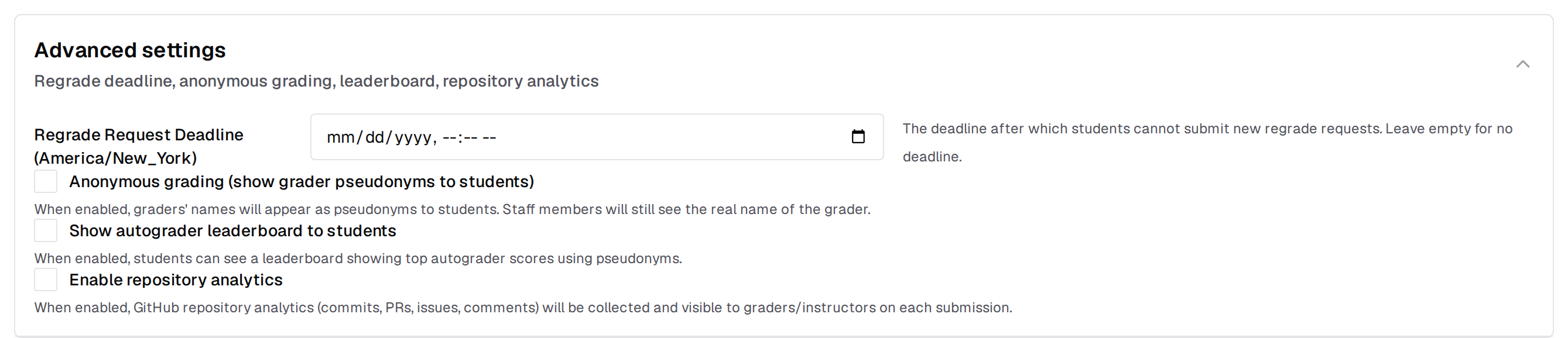
Show autograder leaderboard to students
When checked, students see a leaderboard of the top ten autograder scores in a sidebar panel on their assignment page. Entries are always pseudonymous. See Leaderboard for what students see and how rankings are computed.Anonymous grading (show grader pseudonyms to students)
When checked, students see grader feedback under a stable pseudonym rather than the grader’s real name. Useful when course policy requires anonymized grading.Enable repository analytics
Collects GitHub repository analytics (commits, PRs, issues, and comments) for the assignment’s student repositories and shows them to graders and instructors on each submission. See Repository Analytics.Settings that are not on this form
Submission limits
Autograded-submission rate limits are not on the assignment form. They live on the Configure Autograder page, and they are not opt-in: every assignment is created with a limit of 5 submissions per rolling 24 hours, applied automatically the moment the assignment is created. An instructor who has never opened the Autograder page still has a limit in force. See Submission limits for the fields, what counts against the quota, and the exact strings students see.Empty submission policy
A submission whose collected files are unchanged from the handout is an empty submission, and Pawtograder rejects them. Every assignment that declares submission files in its autograder configuration is created with that rejection in force. A rejected submission cannot be graded, and the student is told that it matches the assignment’s starter code and asked to commit their changes before submitting again. Graders and instructors bypass the check, so you can still submit an unchanged repository when testing an assignment. The comparison covers the files matchingsubmissionFiles, so it respects
whatever scope the autograder configuration defines. An assignment that
declares no submission files — a repo-only assignment, for instance — has
nothing to compare and never rejects a push as empty. See
Empty submission detection
for what students see in each case.